Summer 2025 release: 15+ updates to sharpen your reporting and boost ROI

Written by Faye Thomassen
- Follow every step with the new User Journey feature
- HubSpot just got smarter
- Send only meaningful calls to Google Ads
- Trigger conversions in GA4 based on caller intent
- Dealerweb integration for automotive marketers
- Faster, cleaner reporting
- Smoother call handling, better context
- Match sales to marketing with precision
- Built for marketers who expect more
Marketing doesn’t stand still, and neither should your analytics. That’s why Mediahawk’s latest summer release is packed with updates that reflect a clear goal: to give marketers greater visibility, sharper insights, and more control over every stage of the customer journey.
From understanding exactly what’s driving conversions to streamlining call operations and sharpening ROI reporting, Mediahawk brings powerful tools to help marketers make better decisions, faster.
Here’s what’s new – and how it helps you.
Follow every step with the new User Journey feature
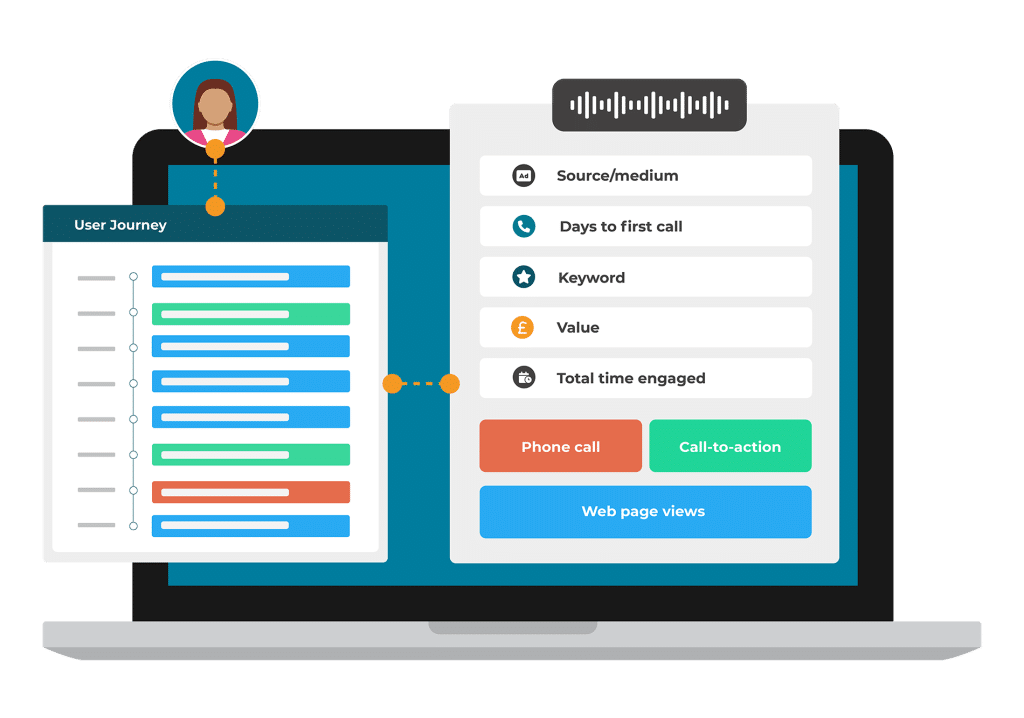 For marketers looking to connect the dots between first click and final conversion, the new User Journey feature offers just that.
This update brings together every touchpoint – from website visits and mobile activity to offline phone calls – into one seamless view of the full customer journey. No more fragmented data or guesswork. Just clear, continuous insight into what’s influencing outcomes.
With User Journey, it’s easier to:
- Visualise the entire conversion path for each user in real-time.
- Spot patterns, drop-off points, and high-converting channels.
- Optimise funnels based on actual behaviour, not assumptions.
“Mediahawk’s User Journey feature is a smarter way to bridge the gap between online and offline interactions. And it addresses a key limitation in traditional web analytics by creating a connected, narrative view of user behaviour.”
– Colin Hudson, Head of Operations, Mediahawk
HubSpot just got smarter
 The latest enhancements to the HubSpot integration are designed to give marketers more actionable intelligence, with greater flexibility over how data is used and mapped.
New updates include:
- E.164 number formatting for improved phone number compatibility (*see note).
- Option to export only inbound calls.
- Last-click source and medium now available as mappable fields.
- Google Click Identifiers (GCLIDs) preserved on existing contacts.
- Voice tags (from Speech Analytics) are now fields that can be mapped to records in HubSpot. This enables lead segmentation by intent, subject, and outcome.
These changes allow for more targeted workflows, personalised lead nurturing, and reporting that ties conversations directly to revenue.
*Note: E.164 formatting is a standardised way of writing phone numbers so they work internationally no matter where your systems or customers are based. For example, a UK number like 01234 567 890 becomes +441234567890.
Send only meaningful calls to Google Ads
 Conversions can now be sent based on call length (e.g. only those lasting over one minute). By setting a call duration threshold – like only counting calls over one minute – you can focus your conversion tracking on high-quality, engaged leads. This helps you:
- Improve conversion accuracy: If you know that calls that last over a certain time are more likely to be genuine enquiries, you can filter out short calls. This helps you avoid inflating your conversion data with low-value interactions.
- Optimise your ad spend: Google uses conversion data to inform bidding. By sending only high-quality calls as conversions, you’re helping Google optimise toward the traffic that actually drives results.
- Analyse your performance more accurately: You’ll get a more realistic view of which keywords, campaigns, or ads are generating valuable leads.
This gives you more control over what counts as a conversion and ensures your PPC campaigns are being evaluated and optimised based on meaningful outcomes.
Trigger conversions in GA4 based on caller intent
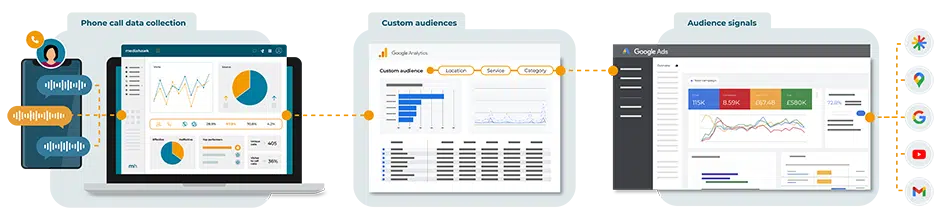
Conversions can now be triggered in GA4 based on interactive voice response (IVR) options, giving you more accurate attribution linked to real intent. This means you can isolate high-value calls, like care home placement enquiries, and treat them as key conversion events.
“For example, if option one on your IVR is for a care home placement, you can send only those calls into GA4 as conversions,” says Colin. “This data can then be used in Google Ads to allow the algorithm – especially in Performance Max campaigns – to better target people who match the profile of genuine care seekers. This results in more relevant clicks, more qualified enquiries, and more efficient spend.”
See how MHA use this feature to improve targeting and reduce their cost per acquisition.
Dealerweb integration for automotive marketers
 We recently launched an integration with Dealerweb, the leading automotive enquiry management platform. Since then, we’ve made some exciting updates.
You can now see exactly when a call was received and how long it took to be added to Dealerweb. Best practice is to add leads straight away to avoid missed opportunities. This new insight helps you identify where improvements can be made.
We call this metric TTA (Time to add), and it’s measured in days.
You can also break this down by secondary dimensions for more granular analysis.
With our Dealerweb integration, you can:
- Identify calls that didn’t make it into Dealerweb
- Compare lead sources to spot discrepancies
- Improve data accuracy and lead tracking
Two easy-to-use reports help you take action:
- Exceptions report – highlights any missed leads
- Leads report – matches Mediahawk source data with Dealerweb enquiry codes
“With our Dealerweb integration, you can monitor match rates over time, helping you fine-tune lead management and get more from your marketing efforts. This powerful integration gives car dealership marketers greater visibility into lead quality and campaign performance.”
– Colin Hudson, Head of Operations, Mediahawk
Faster, cleaner reporting
Data is only useful when it’s easy to interpret. This release introduces several improvements that simplify analysis and reduce time spent digging through reports.
Key updates:
- New filtering options on Speech Analytics dashboards, making it easier to zero in on specific question types
- Customisable columns in the Calls report, so you can focus on the data that matters to you
- Minimum/maximum duration slider on most reports, for faster filtering
- New default dashboards for instant insights
- Reports now default to high-to-low sorting, improving scan-ability and prioritisation
Together, these changes streamline day-to-day reporting and help surface insights more quickly.
Smoother call handling, better context
Operational updates now make it easier to manage and respond to calls in real time:
- Text-to-speech is now available for intros, whispers, and dynamic whispers. This is fully self-serve, and available at no additional cost
- Dynamic whispers now include source information. This gives call handlers another layer of detail by telling them what online source a call came from, such as referring websites or ad platforms – right before the conversation starts
This results in quicker, more relevant responses, and a better experience for both callers and call handling teams.
Match sales to marketing with precision
New reporting filters bring sales and marketing data closer together.
You can now add sales custom dimension fields from Sales Matching as filters or secondary dimensions in the Sources, Source flow, and Paid campaigns reports.
“This makes it easier to drill down into the detail behind your ROI. For example, if you’re a care home marketer, you can compare your overall ROI with the ROI from specific services – like residential or respite care – to see which is delivering better results.”
– Colin Hudson, Head of Operations, Mediahawk
Built for marketers who expect more
“Every update in this release is designed to help marketers work smarter – not harder,” says Colin. “Whether it’s through better attribution, cleaner reporting, or streamlined operations, these improvements reflect Mediahawk’s ongoing commitment to innovation in marketing analytics, attribution, and call tracking.”
With greater visibility, automation, and actionable insights, marketers are better equipped to:
- Optimise campaigns.
- Understand performance.
- Prove and improve ROI.

Book a demo to see how Mediahawk’s powerful features will improve your reporting, increase conversions, and deliver a stronger return on your marketing investment.