Conversion Tracking
Track every conversion – calls, forms, and chat – and see the full story behind each one.
Connect form fills, chats, and calls to campaigns, capture key form field data, and link revenue to what really converts – all with no extra code needed.
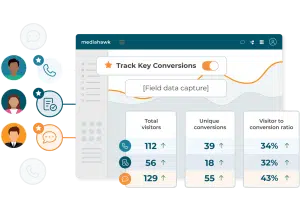
What is conversion tracking?
Conversion tracking measures when a user completes a valuable action after interacting with your marketing. These actions, known as conversion events, can include phone calls, form submissions, purchases, or enquiries.
By linking each conversion to its source, such as a channel, keyword, or campaign, you can clearly see what drives revenue. This helps you optimise performance, improve return on investment, and make confident, data-driven decisions.
Benefits of Mediahawk’s Conversion Tracking
See the whole journey
Calls, forms, and chat in one view.
Know what’s working
Attribute conversions to campaigns, channels, and keywords.
Prove ROI
Link conversions to sales revenue.
Launch fast
Turn it on – no extra code to deploy.
How it solves marketers pain points

- Missing half the picture?
See forms, chats, and calls together in one place to understand how channels work in tandem. - Too much noise in reports?
Filter to key conversions to separate “real leads” from micro actions (e.g., a brochure download). - Struggling to prove real ROI?
Tie conversions to revenue with Sales Matching and attribute value with confidence. - Blind to what prospects actually submit?
Capture selected field values (e.g., name, email, service interest) to qualify leads and enrich analysis. - Implementation headaches?
Switch it on with your existing dynamic tracking – no extra code to add
How it works
in Admin and choose forms and chats to capture.
data (e.g., name, email, opt in).
such as “Request a demo” or “Book a tour” so reports can focus on high value enquiries.
then link to revenue to prove ROI.
Why use Mediahawk's Conversion Tracking

- No coding; avoid Google Tag Manager gymnastics to get started.
- Deeper journey view out of the box for true multi touch insight.
- Stronger ROI proof with Sales Matching and granular conversion details.
- UK centric platform and support trusted across sectors like care, automotive, and healthcare.
Feature highlights
Forms + live chat + calls in one “Conversions” view
Use Mediahawk’s unified Conversions report, and filter by type, campaign, or channel. Then toggle Key conversions to see just lead gen outcomes.
Field level capture for richer insight
Store chosen form fields to segment, qualify, and accelerate follow up.
User Journey timeline
Visualise the full path – from first click to conversion – across online and offline touchpoints; jump straight to journeys that include key conversions.
Track the source behind the conversion
See which channels drive calls, forms, and live chats. Quickly identify top-performing sources to optimise spend and prove ROI.
Revenue matching and attribution
Link conversions to closed won revenue and analyse with multi touch models.
Key conversions “mode”
A simple control lets you switch between All and Key; teams can default to key conversions for day to day reporting on outcomes that matter the most (e.g. enquiries).
No code setup
Leverages your dynamic tracking so you can start capturing forms and chat without adding code.
Tracking conversions, privately and lawfully
Developed with privacy and security requirements in mind. Track conversions first-party data in a way that supports a compliant approach to UK General Data Protection Regulation (UK GDPR) and Privacy and Electronic Communications Regulations (PECR).
Online and offline conversions in one report
Take control of your offline conversion tracking and connect more of your leads back to revenue. Mediahawk bridges offline conversions into Google Ads, feeding enriched call and sales data directly into your campaigns. With accurate conversion signals powering Smart Bidding, you can optimise performance based on real enquiries, not just online actions.

The metrics conversion tracking unlocks
Conversion rate
The percentage of users who complete a desired action, showing how effectively your campaigns turn interest into outcomes.
CPA / CPL
Cost per acquisition (CPA) or cost per lead (CPL) measures how much you spend to generate each conversion, helping control efficiency.
Multi-touch attribution
Assigns value across multiple interactions in the customer journey, rather than crediting a single click.
Macro and micro conversions
Macro conversions reflect key outcomes like sales, while micro conversions track smaller actions such as calls or form fills.
Sales Matching
Matches offline sales data with ad interactions to show which campaigns drive actual revenue.
Frequently asked questions
You can track calls, form submissions, and live chat sessions – all in one place. This gives you a complete view of how prospects engage across channels.
Key Conversions are the most important actions for your business—such as demo requests or booking enquiries. You can flag these and filter reports to focus on what really matters.
No. Conversion Tracking works with your existing dynamic tracking setup, so you can enable it without adding new code or using Google Tag Manager.
Yes. You can capture selected field values (like name, email, or opt in) to qualify leads and enrich your reporting.
Mediahawk lets you associate conversions to closed sales, so you can prove ROI and optimise spend.
No, Google Tag Manager is not required. Mediahawk can be deployed in several ways, including direct installation or via GTM, depending on your setup and preferences.
Yes, Mediahawk integrates with Google Analytics 4 (GA4) to align online behaviour with offline outcomes. This creates a unified view of the customer journey across channels.
Mediahawk connects directly to Google Ads, allowing you to push offline conversion data back into the platform. This powers Smart Bidding strategies with real outcomes, improving optimisation and transparency.
Yes, Mediahawk supports GDPR compliance with secure data handling and privacy-focused processes. As with any tracking solution, you remain responsible for how customer data is managed within your wider marketing stack.
Offline conversions are actions that happen outside your website, such as phone calls or in-store sales. Tracking them ensures your campaigns are optimised for real business impact, not just online activity.
Over 4,000 marketers trust Mediahawk. Discover why today
"*" indicates required fields

“I have been very impressed with the Mediahawk experience, from the onboarding process, to the customer support and the quality of the product.
Everything has been excellent and I would not hesitate to recommend Mediahawk to any business…
Fabulous all round. Thank you!”
Toni Farrington, Promote Online