Segment campaigns in granular detail with multichannel campaign tagging
Dig deeper into your campaign data than ever before to understand ROI and customer behaviour across every marketing channel.
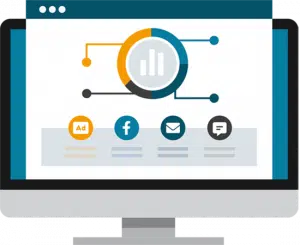
What are the benefits of multichannel campaign tagging?
Pinpoint your most profitable campaigns
Add custom tags to your campaign links to easily segment multichannel marketing campaigns and uncover your most profitable efforts.
Understand prospect behaviour
Analyse your conversions by source to track exactly where your highest-intent leads are coming from.
See reporting data your way
Go granular with your reporting and slice and dice multichannel marketing data in more ways than ever before.
Supercharge your A/B tests
Test the copy, creative, and calls-to-action of your multichannel campaigns.
Find your best-performing campaigns in an instant
Mediahawk’s dashboards are a marketer’s best friend, with simple, intuitive tools to help you do more with your marketing budget. Book a 15-minute demo and see for yourself.
More reasons to love call tracking reports in Mediahawk
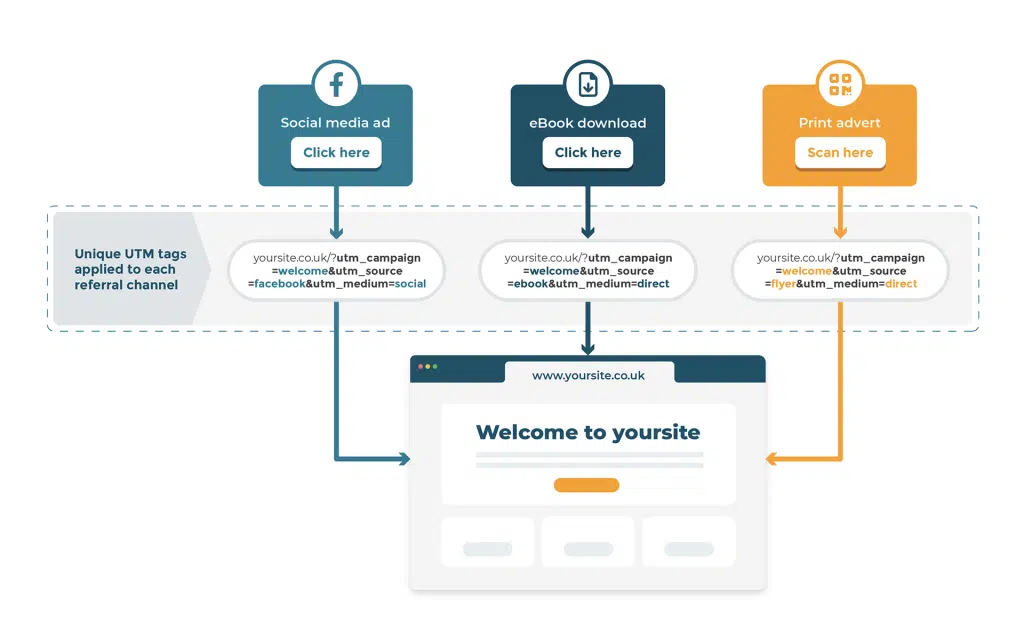
Simple, effortless tagging
Just add a custom tag – much like in Google’s URL Builder tool – to your campaign URLs. Mediahawk will pull in valuable information for each lead, such as device type, campaign, content and creative.

Take segmentation to the next level
With multichannel campaign tagging, you can segment your data in more powerful ways. Apply segmentation’s to track your most effective channels and understand customer behaviour more clearly.
Which martech tools does Mediahawk integrate with?




Read how businesses level up with Mediahawk
“Having a full picture of response has allowed us to be much smarter and confident in our actions, we have upped the ante by considerably improving our campaign effectiveness.”

Frequently asked questions
Mediahawk gives each marketing source its own tracked phone number and uses dynamic number insertion to change the number a visitor sees based on how they arrived. When they call, Mediahawk records whether the visit came from Google Ads, organic search, direct or a named campaign, so paid, organic and direct calls are reported separately.
A dynamic phone number is used on your website to ‘dynamically’ display a unique phone number to each visitor to your website. They allow you to see which of your marketing activities are responsible for generating inbound phone calls from your website. Using dynamic phone numbers on your website enables you to see each of your visitor’s complete journey – from the source and medium (including keyword if they came from PPC), to every single page they viewed, how long they spent on each page, and any other actions they took – including live chats and form fills – as well as phone calls. If they made multiple visits, you can also see each of those, so you get a more complete picture of the touchpoints that your prospects take.
Dynamic phone numbers work by installing a small piece of code to every page of your website. This can be added to the source code of your website, or using Google Tag Manager, or our WordPress plugin.
No, Google Tag Manager is not required. Mediahawk can be deployed in several ways, including direct installation or via GTM, depending on your setup and preferences.
It’s easy to deploy Mediahawk’s dynamic numbers. By linking your Mediahawk account to your Google Tag Manager account, your software can be set up automatically, and you don’t need to touch your HTML. We have online resources and a support team that can guide you if you need assistance.
Not at all. You can apply dynamic numbers to your website in four different ways – using Google Tag Manager, applying the code to your website HTML, or using our WordPress plugin.
To track your offline marketing, you just need to place your static numbers on your newspaper, magazine, leaflet, or out-of-home advertising. You don’t need to change your phones or install any additional hardware to get started.
Mediahawk is packed full of powerful features that help you understand precisely which campaigns generate high-quality calls and leads:
- Marketing attribution tools that give you the most reliable insights into your online and offline marketing performance.
- Detailed call and lead tracking dashboards and reports.
- Conversion Tracking allows you to track every conversion on your website, including form fills, live chats, click-to-call-back, and website email links.
- User Journey enables you to see every user’s visits, calls, form fills, and chats, together in one seamless customer journey.
- Link calls and revenue to the keywords, ad groups, and paid search campaigns that trigger them with PPC call tracking.
- Add revenue to your reports and easily identify the marketing sources that deliver your highest-value phone sales with Sales Matching.
- Understand the effectiveness of your integrated marketing campaigns with Parameter Connect.
- Seamless integrations with Google’s full suite, bid management platforms,CRM systems such as Salesforce, Facebook, and Instagram, and more.
- Call tracking numbers available for 100+ countries. Get an accurate understanding of your calls and sales across the globe.
- AI-powered Speech Analytics enables you to harness insight from every conversation – from getting a summary of the call through to categorising the call based on the outcome.
- Advanced call handling and management features to keep your business running wherever your call handlers are based, ensuring you never miss an enquiry.
- Outbound call tracking and reporting that gives you a full understanding of the effect of outbound calls on lead generation and sales.
Ready to learn more about Mediahawk?
Book a personalised demo today and discover how Mediahawk’s marketing attribution and call tracking software can help your business.
Find out more about the marketing attribution and call tracking tools helping marketers pinpoint their best performing campaigns and boost ROI.
